
For most of my life I have taken for granted that water comes out of the tap (hot and cold), and that electricity flows when I turn on the plug. I love a bit of technology and have not worried about the number of things plugged in or on standby. The spiralling costs of energy and potential shortages of power this winter have begun to change my behaviour.
My heart goes out to Ukrain citizens when I see them queuing for water and without power or heating. I’m thankful that things are not that serious in the UK.
This weekend we have rationalised the devices we have turned on and measured power usage from each device using a plug-in power meter. I think the greatest surprise was the stack of video sources, sound systems and TV that make up our entertainment system. It has a standby power consumption of more than 120 watts. So this is now all turned off when not in use. More than 1KWH a day!
Regular followers of my blog will know I have quite a bit of technology running my home. Sudden power loss is a risk as not everything comes up cleanly, and parts of my network don’t work. So I took the decision to add a UPS (Unintruptable Power Supply) to my server cupboard. To cover my two Synology NAS drives, Unifi network switch and Raspberry PI Servers. The network switch needed to be included as it powers the Raspberry PIs using PoE and the network will be necessary to inform everything to shut down.
After some research, I chose the PowerWalker VI 750. This would give me around 10 to 15 minutes of power, easily enough time to shut down. It is rack mountable, silent, and compatible with Synology and NUT-Server and NUT-Client.
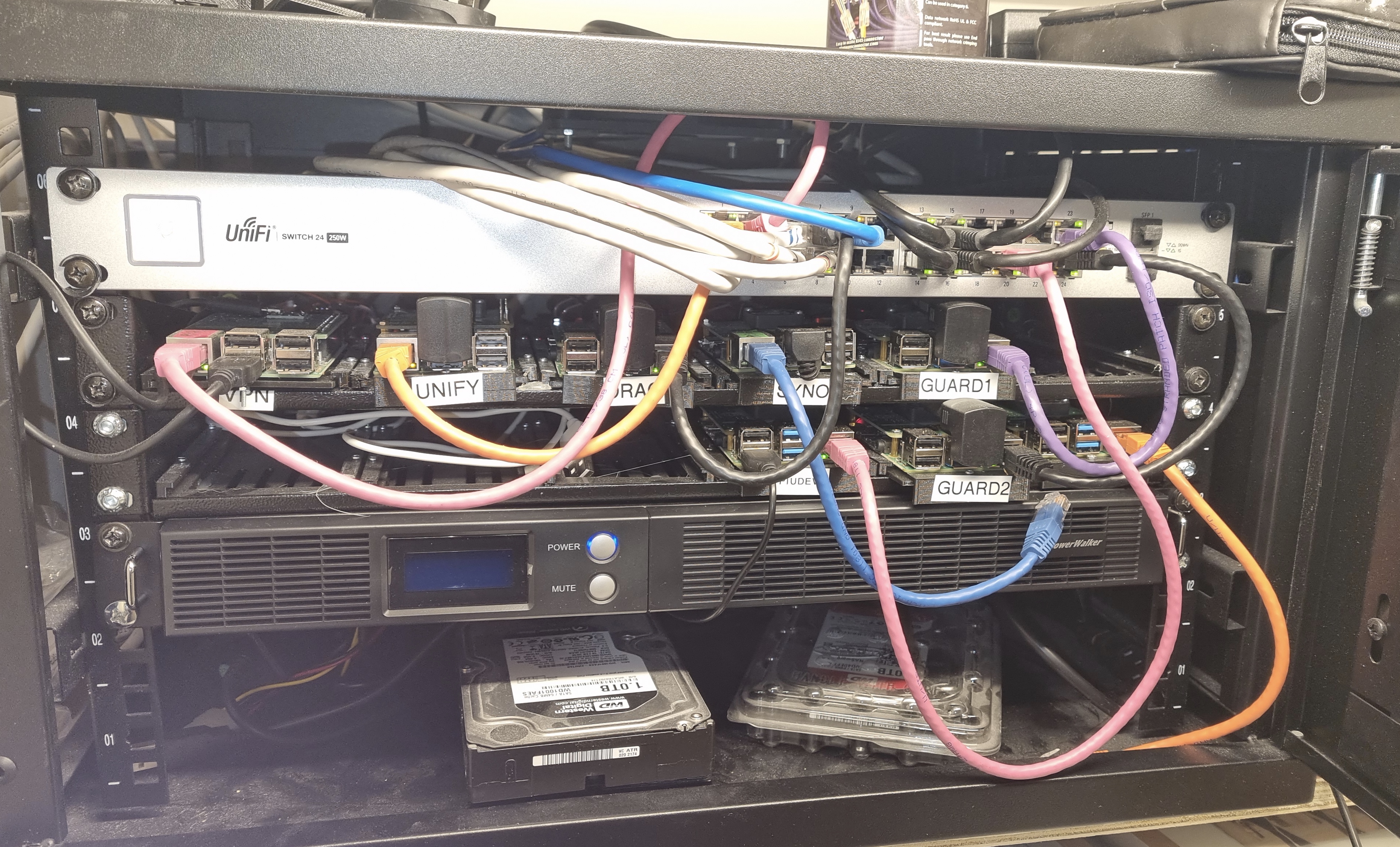
I installed the PowerWalker USB cable directly into one of my Synology NAS drives, having the other NAS as a client. This was easy plug-and-play. Configuring the Raspberry PIs as clients of the Synology UPS Service was a little harder but it works great via NUT-Client. I did have to fix a couple of servers’ IP addresses as the Synology UPS Server only works on IP addresses. It also has a strange limitation of 5 clients, which is a little restrictive. I actually need six and am still exploring workarounds. Please drop me a line if you know a workaround.
In operating the PowerWalker reports it has enough power for 20 minutes of battery operation. That seems to be about right on a test. I am actually quite impressed with how easy it is to install a UPS. Should we have a long power cut we are not protected, with the servers doing a clean shutdown. For a short interruption, the servers will just continue to run.

You’re not winning prizes for cabling nor cleaning the dust, but bonus points for the orphaned harddisk 🙂
Didn’t think dusting or cabling where my prize winning skills 😉